Everyone loves a good throwback, right? Whether it’s fashion from the ’90s or a classic movie, the old can become new and exciting again. Just like flared jeans and blue eyeshadow is making a comeback with Gen Z, with a couple little updated tweaks, the same goes for your old blog posts. Updating old blog posts isn’t just a walk down memory lane—it’s a great way to boost your SEO and give your traffic a serious lift! So, let’s do a makeover montage from every 90’s movie ever, except this time…let’s go behind the scenes of the movie magic and reveal the secrets of how and why.
Why Update Old Blog Posts?
Accuracy: Let’s face it, the internet moves at lightning speed. What’s true today might not be tomorrow. Keeping your content fresh and accurate ensures it remains useful to your readers. If it makes sense to include a date in your blog title, use it! Users like knowing that you have the most up-to-date information and will be more likely to click on it. Example: “5 Benefits of EMDR Therapy in 2025”.
SEO Benefits: Google loves fresh content. By updating your posts, you improve your chances of climbing those search rankings.
Internal Links: Think of your blog as a web (pun intended). Linking older posts to newer ones keeps your audience exploring and engaged. The longer users are on your website, the better engagement rate you will have, and as a result a better ranking. The same goes for updating broken links, if your users are presented with a 404 Page Not Found error, they are more likely to leave your website!
Less Work: Less is more when it comes to meticulous work! With old blog posts, you have an idea what worked and what didn’t. By polishing up your old work and giving it a lift instead of creating something new from scratch, you can gain more traffic while saving time better spent serving your clients.
Identifying Posts to Update
Traffic Decline: Start with the basics. Use tools like Google Analytics or Google Search Console to spot posts that aren’t pulling their weight anymore. Prioritize the blog posts that were getting clicks on Google searches 3-6 months ago but now have dropped off. Google prioritizes more recent posts so if you update them with new information, add a newly learned tip or trending recommendation, and remove outdated content, you should get a boost in ranking on these pages.
Ranking Drops: A successful post suddenly drop in rankings? Rank trackers like Semrush or Ahrefs can be very helpful here. These tools highlight which pages have dropped from the first page of search results. Use this information and flag those pages to refresh. It’s time to bring these posts back to life!
Steps to Update Old Blog Posts for SEO
1. Keyword Research:
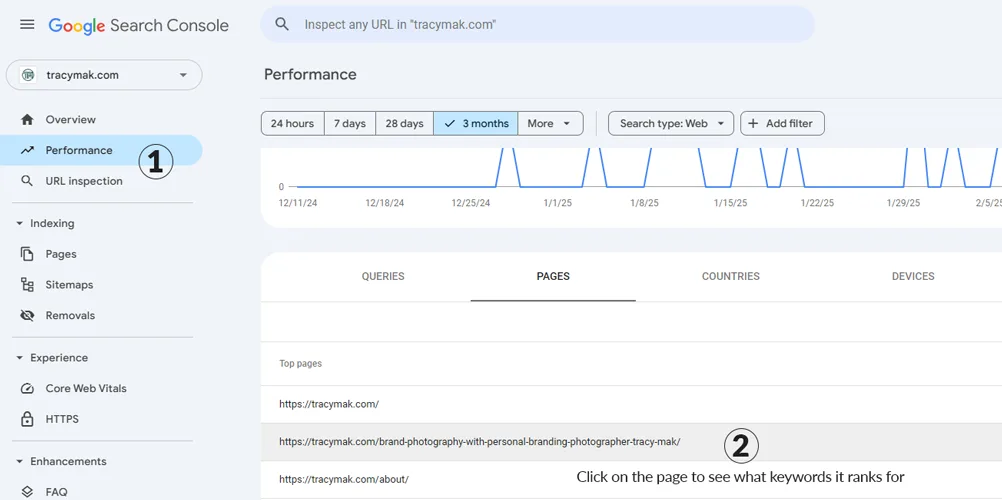
First, we have to see what keywords the post is currently ranking for. Then, we need to assess if that’s what you want to rank for.
- Open Google Search Console: Log in and navigate to “Performance”.
- Select Page to Analyze: Choose a specific URL and see which queries it ranks for. Look at the top keywords that are bringing visitors to your website.
2. Choose Target Keywords:
- Identify Main Keyword: Pick the most relevant keyword based on search intent.
- Select Secondary Keywords: Consider adding related terms that enhance the article’s focus.
3. Analyze Top Search Results:
- Search Your Target Keyword: Note the type of content in top results.
- Identify Content Patterns: Look for listicles, how-tos, or guides dominating the page.
- Outline Competitor Insights: See what topics they cover and any gaps you can fill.
4. Update Content:
Now that we have done all the relevant research, it’s time to roll up our sleeves and start editing! Refresh old facts and include up-to-date information. Add new sections that introduce new insights, ideas, or angles. Ensure quality content by proofreading and correcting any errors in language or formatting.
5. Optimize for Keywords:
Sprinkle any updated keywords or secondary keywords into your content, headings, and subheadings in a natural way. However: Don’t keyword stuff! Repeating your keywords over and over again does more harm than good.
6. Update Internal Links and Fix Broken Links:
A quick and easy fix to refresh old posts with minimal time and effort on your part.
- Identify Relevant Articles: Find related posts to link to.
- Integrate Links Naturally: Ensure links are contextually relevant to the reader.
- Use Descriptive Anchor Text: Keep anchor text clear and relevant to the linked content.
7. Enhance with Media:
Sometimes your message is best conveyed with a picture or a video. Did you remodel your location? Sharing a yoga move of the week? Hire a new employee? A video or picture is worth 1,000 words if done right!
- Include High-Quality Images: Use relevant visuals and optimize file sizes.
- Add Subtitles or Alt Text: Write descriptive alt text for pictures or add subtitles to videos in order to improve accessibility for those who are seeing or hearing impaired. It proves to clients that you care about your community.
- Embed Videos: If applicable, support content with video demonstrations or explanations.
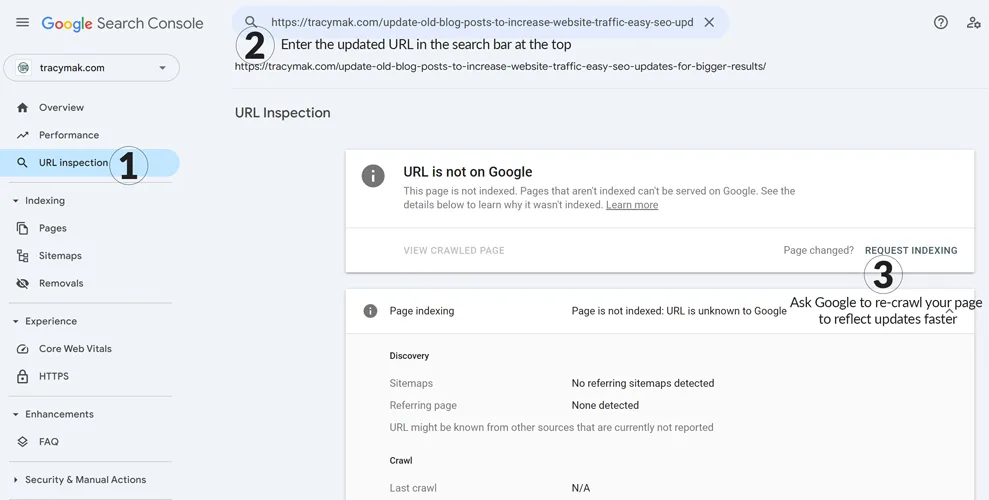
8. Request Reindexing:
Once you’ve completed the checklist, it’s time to let Google know you’ve updated your content! The easiest and fastest way to do this, is to request reindexing.
- Access Google Search Console: Enter the updated URL in the search bar at the top.
- Select “Request Indexing”: Ask Google to re-crawl your page to reflect updates faster.
Developing a Long-term Update Strategy
Regular Audits: Schedule content reviews as you would dental check-ups. Tracking updates through Google Analytics or other SEO tools is a great way to stay on top of any major shifts in ranking.
Rank Tracking: Continuous monitoring helps catch any dips early.
Prioritize Based on Goals: Keep your updates aligned with what you’re aiming for—traffic, engagement, or revenue.
Updating old blog posts isn’t rocket science, but it can rocket launch your results. Consistent updates keep your content dynamic and your audience engaged.
Ready to bring your old content back to the future? Tracy Mak Studio is here to assist! Sign up for a C3 Website Review to pinpoint which of your posts need that refreshing touch. For more information, don’t hesitate to reach out to us at Tracy Mak Studio. Let’s make your content shine again!